Wird aktualisiert



iPhone Screenshots

iPad Screenshots


Beschreibung
Genius Sign is the best app to sign, date and annotate your documents.
“Genius Sign shaved off about 30 min of my daily routine.” – Jane D., realtor
“I wish I had known about this app before” – Mike C., business owner
Have you ever printed a contract you received by email, just to sign it and scan it before sending it back? Well, Genius Sign is now going to save you a lot of time, trouble, and paper.
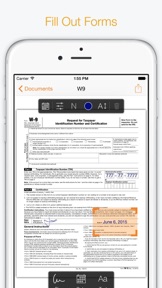
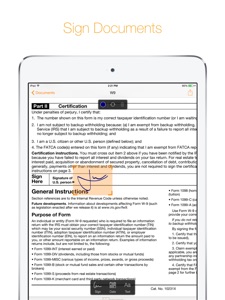
With Genius Sign, you can import any PDF document or image from another app and insert your signature, some text or date before exporting it to any cloud service you like or by email.
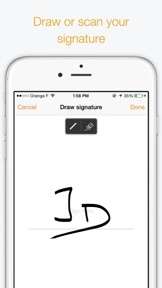
To sign, simply draw your signature on the screen with your finger. If you prefer a signature that’s closer to your usual one, sign on a paper, and use our award-winning scanning technology to capture it.
Genius Sign features two smart technologies that save you tons of time:
“Sign Here” magically detects the pages you need to sign avoiding you to browse through the entire document
“Auto Repeat” enables you to repeat your initials on all pages of a document
Worried about someone being able to use your signature or view your confidential documents? Simply enable Touch ID to protect Genius Sign from the outside world.
Need even more? Okay, here is a complete list of Genius Sign features:
- Create and save new signatures, either by drawing or scanning them
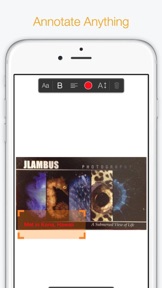
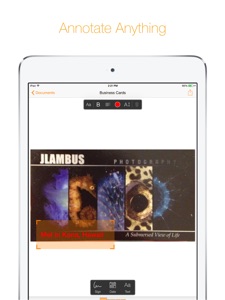
- Insert text and date, change their format, color, style or size
- Repeat a signature on every pages of a document with “Auto Repeat”
- Navigate quickly through the document and position precisely your annotations
- Quickly locate the signature fields in your documents with our Sign Here feature
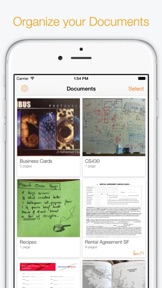
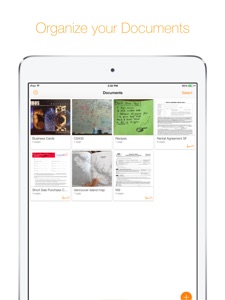
- Import your document from Genius Scan, the gallery, any cloud service or take a picture of it
- Export it by email, with Genius Fax, to your printer, your FTP, or your favorite cloud service (we support them all: Dropbox, Google Drive, Box, OneNote, OneDrive, Sugarsync, Evernote...)
- See how many signatures you added to a document
- Protect Genius Sign with Touch ID (or with a passcode)
Genius Sign takes advantage of iOS 8 with support for Touch ID and a Photo Editing extension.
Genius Sign is also fully compatible with Genius Scan.
And this is only the beginning... Let us know if you need anything not listed and we’ll consider adding it to the app.
Send us your feedback, questions and concerns to support@geniussign.com.
Neue Funktionen von Version 1.3.4
- Fixed crash when exporting to other apps on iPad
- Fixed crash when scanning a new signature
- Fixed crash related to Face ID affecting iPhone X
- Fixed bug that could prevent exports to cloud services
If you like Genius Sign, don't forget to leave a review. It means a lot to us! If you have any issue with the update, please reach us at support@geniussign.com. We read and reply to every email.
Anbieter
Name
The Grizzly Labs
Informationen
Entwickler
Kategorien
Version
1.3.4
Größe
13 MB
Game Center
Nein
VPP Device Licensing
Ja
Bewertung
Altersfreigabe: 4+
Kompatibilität
iOS 11.0 oder neuer
Geräte
iPad Pro (11"), iPad (5. Generation) Wi-Fi, iPad (6. Generation) Wi-Fi, iPod touch (6. Generation), iPad Pro (11") Wi-Fi + Cellular, iPad (6. Generation) Wi-Fi + Cellular, iPad Pro (12,9", 3. Generation), iPad (5. Generation) Wi-Fi + Cellular, iPad mini (5. Generation) Wi-Fi + Cellular, iPad mini (5. Generation), iPad Pro, iPad mini Retina (Cellular), iPad Air 2 (Cellular), iPad mini 4 (Cellular), iPad Pro (Cellular), iPhone 6, iPad Pro (10,5") Wi-Fi + Cellular, iPhone 5s, iPad Air (3. Generation) Wi-Fi + Cellular, iPhone 7 Plus, iPad Air (3. Generation), iPhone 8 Plus, iPad Pro (12,9", 2. Generation) Wi-Fi + Cellular, iPhone 6s, iPhone 6 Plus, iPhone XS, iPhone XR, iPhone SE, iPad Pro (9,7 Zoll), iPhone 6s Plus, iPad Pro (9,7 Zoll) (Cellular), iPhone X, iPhone 8, iPhone XS Max, iPad Pro (10,5"), iPhone 7, iPad Pro (12,9", 3. Generation) Wi-Fi + Cellular
Sprachen
Deutsch, Englisch, Französisch, Spanisch
App Store: Kundenbewertungen
Bewertungen & Rezensionen
4,5 von 5 (32 Bewertungen)
App Store: Kundenrezensionen
Kein Eintrag