InfoBedingungenDatenschutzKontakt
 
Wird aktualisiert
Anchor Alarm for Boaters

Anchor Alarm for Boaters

Veröffentlicht: 2013-12-06
© Ndili Technologies, Inc.
Anchor Alarm for Boaters - QR Code
Version 3.0
4+
Laden im App Store
Version 3.0
4+
Laden im App Store
Veröffentlicht: 2013-12-06
© Ndili Technologies, Inc.

iPhone Screenshots

Screenshot
Screenshot
Screenshot

iPad Screenshots

Screenshot
Screenshot
Screenshot
Screenshot
Screenshot
Screenshot
Screenshot
Screenshot

Beschreibung

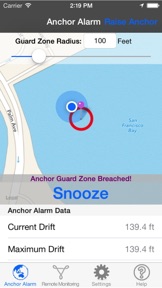
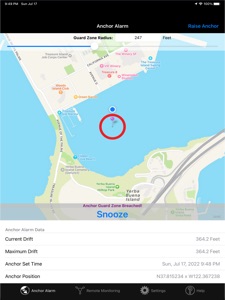
Anchor Alarm monitors your anchored boat, and alerts you when it moves out of your defined region. Set and forget: Anchor Alarm works in the background to maintain anchor watch AND let you simultaneously use your iPhone/iPad for other purposes too. Anchor Alarm will alert you if it detects excursions beyond your set boundaries.
Powerful but easy to use: to start an anchor watch session, simply tap the "Drop Anchor" button. This app contains new and very powerful monitoring features, including the following:
• Supports remote monitoring of your boat, so now you can monitor your boat, live, from anywhere in the world*
• Easily configure your protection circle: View your geo-fenced zone on a map and easily adjust your protected region in real-time with immediate visual feedback.
• Operates in the background: Allows you full use your iPhone or iPad while diligently performing its Anchor Watch duties in the background; Play music or games with your device, ok to use other apps: Anchor Alarm unobtrusively maintains anchor watch in the background.
• Works even when you mute or close your device or put its screen to sleep.
• Supports full remote monitoring AND tracking of your boat - play back your boat's track*
• Store and keep track of your GPS position of your favorite anchorages*
• Choose from multiple different alert sound options; When an anchor alarm is triggered this app will be sure to get your attention with its many alert options
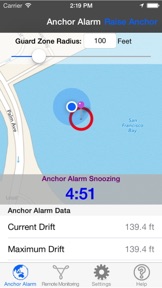
• When an alert is triggered, you can snooze the alarm, widen your geo-fence, or simply 'raise anchor'.
• And many more features...
With the Remote Monitoring and Tracking* features, the usefulness of the app is greatly increased:
• Share your live location and tracks automatically with anyone anywhere in the world.
• Your authorized viewers will be able to see you movements live via a secure web browser.
• Remotely monitor and track all authorized (and unauthorized) movements of your boat: track your boat's precise location with high accuracy
• Remotely play back your anchor session tracks with time histories of positions, speeds with direction, and battery status
Anchor Alarm includes a large amount of functionality, some contained within the App, some accessible only when used remotely, from a computer or another mobile device with internet access.
• To start an anchor watch session, tap the "Drop Anchor" button.
• If desired, adjust your alert zone with the provided slider, or enter it directly. Note: default geo-fence radius units are feet, but you can change the units to meters, nautical miles, miles or kilometers via the app's Settings module.
• To end your anchor watch session, tap on the "Raise Anchor" button.
• Activate Remote Monitoring from either the Remote Monitoring module or the Settings module of this app.
• To remotely monitor your current anchor session in live mode, first activate remote monitoring, then start an anchor session. A "Share" button will appear on the main screen of this app. Tap on this button to share the Remote Access URL for the current anchor session.
• To view or share both current and past anchor sessions, select the anchoring session you want to share from the "Remote Monitor" module of this app, then select the "Share Track via Email" or "Share Track via SMS" option.
To view and/or modify other settings of this app, please select the "Settings Module".
Notes:
- This app can, and does operate in background-mode, for iOS devices with version 4.0 or higher software. If you have version 4.0 or higher operating system on your iPhone or iPad, you can return to the home screen after starting the Tracking Mode on this app, for a silent background operation.
- *Remote monitoring and tracking features require an in-app purchase to activate.
- Continued use of GPS running in the background can dramatically decrease battery life. We recommend you plug in your device for extended monitor sessions.

Neue Funktionen von Version 3.0

- robust anchor alert monitoring even when your device screen is off and/or the app is in background

Anbieter

Name

Ndili Technologies, Inc

Informationen

Kategorien

Version

3.0

Größe

60,4 MB

Game Center

Nein

VPP Device Licensing

Ja

Bewertung

Altersfreigabe: 4+

Kompatibilität

iOS 12.0 oder neuer

Geräte

iPhone 5s, iPhone 6, iPhone 6 Plus, iPhone 6s, iPhone 6s Plus, iPhone SE, iPhone 7, iPhone 7 Plus, iPhone 8, iPhone 8 Plus, iPhone X, iPhone XR, iPhone XS, iPhone XS Max, iPhone 11, iPhone 11 Pro, iPhone 11 Pro Max, iPhone SE (2. Generation), iPhone 12, iPhone 12 Pro, iPhone 12 Pro Max, iPhone 12 mini, iPhone 13, iPhone 13 Pro, iPhone 13 Pro Max, iPhone 13 mini, iPhone SE (3. Generation), iPhone 14, iPhone 14 Plus, iPhone 14 Pro, iPhone 14 Pro Max, iPhone 15, iPhone 15 Plus, iPhone 15 Pro, iPhone 15 Pro Max, iPhone 16, iPhone 16 Plus, iPhone 16 Pro, iPhone 16 Pro Max, iPhone 16e, iPhone 17, iPhone 17Pro, iPhone 17ProMax, iPhone Air, iPad (5. Generation) Wi-Fi, iPad (5. Generation) Wi-Fi + Cellular, iPad (6. Generation) Wi-Fi, iPad (6. Generation) Wi-Fi + Cellular, iPad Pro, iPad Pro (Cellular), iPad Pro (9,7 Zoll), iPad Pro (9,7 Zoll) (Cellular), iPad Pro (12,9", 2. Generation), iPad Pro (12,9", 2. Generation) Wi-Fi + Cellular, iPad Pro (10,5"), iPad Pro (10,5") Wi-Fi + Cellular, iPad Pro (11"), iPad Pro (11") Wi-Fi + Cellular, iPad Pro (12,9", 3. Generation), iPad Pro (12,9", 3. Generation) Wi-Fi + Cellular, iPad Air, iPad Air (Cellular), iPad Air 2, iPad Air 2 (Cellular), iPad Air (3. Generation), iPad Air (3. Generation) Wi-Fi + Cellular, iPad mini Retina, iPad mini Retina (Cellular), iPad mini 3, iPad mini 3 (Cellular), iPad mini 4, iPad mini 4 (Cellular), iPad mini (5. Generation), iPad mini (5. Generation) Wi-Fi + Cellular, iPad (7. Generation) Wi-Fi + Cellular, iPad Pro 11" (2. Generation), iPad Pro 11" (2. Generation) Wi-Fi + Cellular, iPad Pro 12,9" (4. Generation), iPad Pro 12,9" (4. Generation) Wi-Fi + Cellular, iPad Air (4. Generation) (Wi-Fi), iPad Air (4. Generation) (Wi-Fi + Cellular), iPad (8. Generation) Wi-Fi, iPad (8. Generation) Wi-Fi + Cellular, iPad Pro 11" (3. Generation), iPad Pro 11" (3. Generation) Wi-Fi + Cellular, iPad Pro 12,9" (5. Generation), iPad Pro 12,9" (5. Generation) Wi-Fi + Cellular, iPad (9. Generation), iPad (9. Generation) Wi-Fi + Cellular, iPad mini (6. Generation), iPad mini (6. Generation) Wi-Fi + Cellular, iPad Air (5. Generation), iPad Air (5. Generation) Wi-Fi + Cellular, iPad Pro 11" (4. Generation), iPad Pro 11" (4. Generation) Wi-Fi + Cellular, iPad Pro (12,9", 6. Generation), iPad Pro (12,9", 6. Generation) Wi-Fi + Cellular, iPad (10. Generation), iPad (10. Generation) Wi-Fi + Cellular, iPad Air (11″, M2, Wi-Fi), iPad Air (13″, M2, Wi-Fi), iPad Air (13″, M2, Wi-Fi + Cellular), iPad Pro (11″, M4, Wi-Fi), iPad Pro (11″, M4, Wi-Fi + Cellular), iPad Pro (13″, M4, Wi-Fi), iPad Pro (13″, M4, Wi-Fi + Cellular), iPad mini (A17 Pro) Wi-Fi, iPad mini (A17 Pro) Wi-Fi + Cellular, iPad (A16) Wi-Fi, iPad (A16) Wi-Fi + Cellular, iPad Air 11" (M3) Wi-Fi, iPad Air 11" (M3) Wi-Fi + Cellular, iPad Air 13" (M3) Wi-Fi, iPad Air 13" (M3) Wi-Fi + Cellular, iPad Pro11M5, iPad Pro11M5Cellular, iPad Pro13M5, iPad Pro13M5Cellular, iPod touch (6. Generation), iPod touch (7. Generation)

Sprachen

Englisch

App Store: Kundenbewertungen

Bewertungen & Rezensionen

3,0 von 5 (1 Bewertung)

App Store: Kundenrezensionen

2014-09-17

missing feature

basic anchor alarm, missing the ability to edit anchor bearing and distance.
sailing jarod 59
Version 1.0