Wird aktualisiert

Data Manager - Monitor Data Usage
Veröffentlicht: 2013-11-01
© Copyright (c) 2017 - Nutec Apps, LLC


iPhone Screenshots

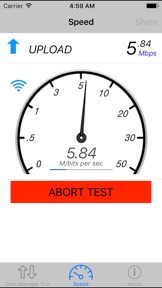

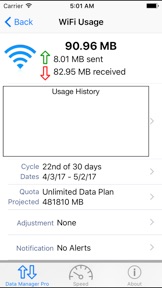
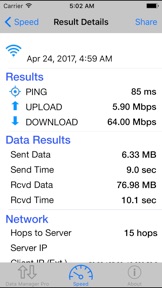
iPad Screenshots


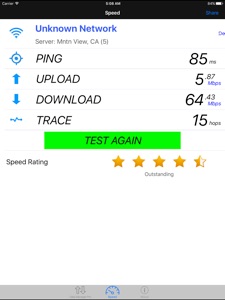


Beschreibung
Data Manager - Data Usage with Speed Check
Monitor the Data Usage and Speed on your device in Real Time for FREE. Stop paying overage fees!
Data Manager will manage both Cellular (4G/LTE/3G/Edge/GPRS) and Wi-Fi data usage in real time from your device. This FREE app will let you be in control of your data usage to avoid the costly overage charges your provider may charge providing alerts when data usage reaches user thresholds. This app monitors data usage from the device itself and is not reliant on setting up or logging into your provider's server or web site. Data Manager also includes the ability to Speed Test your cellular or WiFi connection rate and response for you device. This simple, easy-to-use app provides consistent, accurate internet speed testing from any location.
Data Usage Features include:
- Monitor mobile Cellular data for all technologies (4G LTE 3G Edge GPRS etc.) int real time.
- View the amount of internet data you use over your WiFi connection.
- Simple and clear user interface with custom progress bar that graphically shows your data usage and predicted usage.
- Works with ANY cellular provider in any country including AT&T, Verizon, Sprint, T-Mobile, Rodgers, Virgin Mobile, Orange, O2, etc. by reading data usage from the device.
- Billing periods and quota limits can be configured on a monthly, weekly or custom time basis to match your providers billing schedule.
- Works on any iOS device (iPhone/iPad/iPod Touch) running iOS 7.x or later.
- Works in the background using battery efficient background monitoring in iOS 7 to monitor usage and notify users when data usage reaches configured limits.
- App Badge Monitoring shows the % as a app badge without even opening the app.
Advanced Data Usage Features:
- Custom counters can be setup allow you to monitor usage during a certain period to help identify data hogging apps. Counters can be easily enabled or disabled and can even be configured to end at a predetermined time.
- History graph shows previous data usage for each day.
- Email your usage information at any time.
Speed Check Features:
– Simple, one button tap performs (or cancels) the tests.
– Simple, easy-to-read tracking and reporting.
– Testing features download rate, upload rate and latency (response) time.
- Includes the number of hops/gateways between the mobile client and the server (Trace Route).
- Works on either Cellular data from any carrier or when connected via WiFi.
- Conveniently share results with others via email.
- Testing servers located around the world for accurate results.
– Unlimited on-the-go testing - mobile speed check.
- Best of all it's FREE!
Data Manager is a must have app for anybody on a restrictive data plan and to verify your network speed! Don't pay those expensive overage charges again.
Neue Funktionen von Version 2.26
This app has been updated by Apple to display the Apple Watch app icon.
Minor UI Changes
Informationen
Entwickler
Kategorien
Version
2.26
Größe
10,8 MB
Game Center
Nein
VPP Device Licensing
Ja
Bewertung
Altersfreigabe: 4+
Kompatibilität
iOS 8.0 oder neuer
Geräte
iPhone 4S, iPhone 5, iPhone 5c, iPhone 5s, iPhone 6, iPhone 6 Plus, iPhone 6s, iPhone 6s Plus, iPhone SE, iPhone 7, iPhone 7 Plus, iPhone 8, iPhone 8 Plus, iPhone X, iPhone XR, iPhone XS, iPhone XS Max, iPhone 11, iPhone 11 Pro, iPhone 11 Pro Max, iPhone SE (2. Generation), iPhone 12, iPhone 12 Pro, iPhone 12 Pro Max, iPhone 12 mini, iPhone 13, iPhone 13 Pro, iPhone 13 Pro Max, iPhone 13 mini, iPhone SE (3. Generation), iPhone 14, iPhone 14 Plus, iPhone 14 Pro, iPhone 14 Pro Max, iPad 2 (Wi-Fi), iPad 2 (3G), iPad (3. Generation) (Wi-Fi), iPad (3. Generation) (4G), iPad (4. Generation) (Wi-Fi), iPad (4. Generation) (4G), iPad (5. Generation) Wi-Fi, iPad (5. Generation) Wi-Fi + Cellular, iPad (6. Generation) Wi-Fi, iPad (6. Generation) Wi-Fi + Cellular, iPad Pro, iPad Pro (Cellular), iPad Pro (9,7 Zoll), iPad Pro (9,7 Zoll) (Cellular), iPad Pro (12,9", 2. Generation), iPad Pro (12,9", 2. Generation) Wi-Fi + Cellular, iPad Pro (10,5"), iPad Pro (10,5") Wi-Fi + Cellular, iPad Pro (11"), iPad Pro (11") Wi-Fi + Cellular, iPad Pro (12,9", 3. Generation), iPad Pro (12,9", 3. Generation) Wi-Fi + Cellular, iPad Air, iPad Air (Cellular), iPad Air 2, iPad Air 2 (Cellular), iPad Air (3. Generation), iPad Air (3. Generation) Wi-Fi + Cellular, iPad mini (Wi-Fi), iPad mini (4G), iPad mini Retina, iPad mini Retina (Cellular), iPad mini 3, iPad mini 3 (Cellular), iPad mini 4, iPad mini 4 (Cellular), iPad mini (5. Generation), iPad mini (5. Generation) Wi-Fi + Cellular, iPad (7. Generation) Wi-Fi + Cellular, iPad Pro 11" (2. Generation), iPad Pro 11" (2. Generation) Wi-Fi + Cellular, iPad Pro 12,9" (4. Generation), iPad Pro 12,9" (4. Generation) Wi-Fi + Cellular, iPad Air (4. Generation) (Wi-Fi), iPad Air (4. Generation) (Wi-Fi + Cellular), iPad (8. Generation) Wi-Fi, iPad (8. Generation) Wi-Fi + Cellular, iPad Pro 11" (3. Generation), iPad Pro 11" (3. Generation) Wi-Fi + Cellular, iPad Pro 12,9" (5. Generation), iPad Pro 12,9" (5. Generation) Wi-Fi + Cellular, iPad (9. Generation), iPad (9. Generation) Wi-Fi + Cellular, iPad mini (6. Generation), iPad mini (6. Generation) Wi-Fi + Cellular, iPad Air (5. Generation), iPad Air (5. Generation) Wi-Fi + Cellular, iPad Pro 11" (4. Generation), iPad Pro 11" (4. Generation) Wi-Fi + Cellular, iPad Pro (12,9", 6. Generation), iPad Pro (12,9", 6. Generation) Wi-Fi + Cellular, iPad (10. Generation), iPad (10. Generation) Wi-Fi + Cellular, iPod (5. Generation), iPod touch (6. Generation), iPod touch (7. Generation)
Sprachen
Englisch, Spanisch
App Store: Kundenbewertungen
Bewertungen & Rezensionen
0,0 von 5 (Keine Bewertung)
App Store: Kundenrezensionen
Kein Eintrag