Wird aktualisiert


iPhone Screenshots




iPad Screenshots


Beschreibung
■ App Description
This app uses stereograms to help improve eyesight.
This application is the 2nd phase of "3D Sight Recover" which made a smashing success.
There are two functions that affect eyesight—eye muscle function and brain function.
Eye muscle function controls what we generally call eyesight, and it is the ability of our eyes to focus on what we see. The brain function that affects eyesight is the ability of our brain to recognize and visualize what we see physically. In order to improve eyesight, you need to not only strengthen the eye muscles, but also increase the ability of your brain to perceive visual images.
In 3D Eyesight Recovery, by looking at a 3D stereogram,
- you can strengthen brain functions by focusing the eyes on a 3D image,
- at the same time you can use eye muscles that you normally do not use,
- and by switching from the walleyed method to the cross-eyed method, to opposite ways of seeing, you exercise the eyes.
- Additionally, the stereograms make it fun to continue exercising the eyes.
In other words, using the app in this way will give you the four benefits above at the same time. You will have fun while providing your eyes with good exercise.
■ Instructions for Use
Look at the stereogram using the walleyed method and the cross-eyed method, one after the other. Use this app regularly on a daily basis.
■ Walleyed Method (diverge)
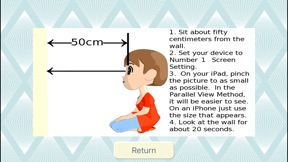
Instead of looking at the picture, focus on a point further ahead of the picture. If you continue to look far ahead, the two eyes you see in the upper part of the picture will look like four eyes, and then the two eyes on the inside will start to move closer together until they become one. If you move your line of vision to the picture, the flat picture will look three-dimensional. If this is your first time using a 3D stereogram, you may be surprised when this happens. It will be difficult at first, but once you get used to it, it will be easier, so do not give up.
■ Cross-eyed Method (converge)
In this method, you look at the left side of the picture with your right eye and the right side with your left eye. Unlike the walleyed method, you adjust the focus to a point closer to you than the picture. Place a finger between your eyes and the picture and look at your finger. The picture is behind the finger so your eyes will naturally see the opposite side of the picture, so maintain that line of vision and remove your finger. It requires some practice, but as you gradually adjust your focus, the picture will begin to appear three-dimensional.
Looking at 3D stereograms is exercise, so your eyes will get tired. Please refrain from using this app for extended periods of time so as not to tire your eyes.
Neue Funktionen von Version 1.15
- Fixed so that the setting magnification of the Move function is saved even after closing the application.
- Fixed a minor bug.
Anbieter
Name
Katsuhisa Koike
Informationen
Entwickler
Kategorien
Version
1.15
Größe
238 MB
Game Center
Nein
VPP Device Licensing
Ja
Bewertung
Altersfreigabe: 4+
Kompatibilität
iOS 12.0 oder neuer
Geräte
iPhone 5s, iPhone 6, iPhone 6 Plus, iPhone 6s, iPhone 6s Plus, iPhone SE, iPhone 7, iPhone 7 Plus, iPhone 8, iPhone 8 Plus, iPhone X, iPhone XR, iPhone XS, iPhone XS Max, iPhone 11, iPhone 11 Pro, iPhone 11 Pro Max, iPhone SE (2. Generation), iPhone 12, iPhone 12 Pro, iPhone 12 Pro Max, iPhone 12 mini, iPhone 13, iPhone 13 Pro, iPhone 13 Pro Max, iPhone 13 mini, iPhone SE (3. Generation), iPhone 14, iPhone 14 Plus, iPhone 14 Pro, iPhone 14 Pro Max, iPad (5. Generation) Wi-Fi, iPad (5. Generation) Wi-Fi + Cellular, iPad (6. Generation) Wi-Fi, iPad (6. Generation) Wi-Fi + Cellular, iPad Pro, iPad Pro (Cellular), iPad Pro (9,7 Zoll), iPad Pro (9,7 Zoll) (Cellular), iPad Pro (12,9", 2. Generation), iPad Pro (12,9", 2. Generation) Wi-Fi + Cellular, iPad Pro (10,5"), iPad Pro (10,5") Wi-Fi + Cellular, iPad Pro (11"), iPad Pro (11") Wi-Fi + Cellular, iPad Pro (12,9", 3. Generation), iPad Pro (12,9", 3. Generation) Wi-Fi + Cellular, iPad Air, iPad Air (Cellular), iPad Air 2, iPad Air 2 (Cellular), iPad Air (3. Generation), iPad Air (3. Generation) Wi-Fi + Cellular, iPad mini Retina, iPad mini Retina (Cellular), iPad mini 3, iPad mini 3 (Cellular), iPad mini 4, iPad mini 4 (Cellular), iPad mini (5. Generation), iPad mini (5. Generation) Wi-Fi + Cellular, iPad (7. Generation) Wi-Fi + Cellular, iPad Pro 11" (2. Generation), iPad Pro 11" (2. Generation) Wi-Fi + Cellular, iPad Pro 12,9" (4. Generation), iPad Pro 12,9" (4. Generation) Wi-Fi + Cellular, iPad Air (4. Generation) (Wi-Fi), iPad Air (4. Generation) (Wi-Fi + Cellular), iPad (8. Generation) Wi-Fi, iPad (8. Generation) Wi-Fi + Cellular, iPad Pro 11" (3. Generation), iPad Pro 11" (3. Generation) Wi-Fi + Cellular, iPad Pro 12,9" (5. Generation), iPad Pro 12,9" (5. Generation) Wi-Fi + Cellular, iPad (9. Generation), iPad (9. Generation) Wi-Fi + Cellular, iPad mini (6. Generation), iPad mini (6. Generation) Wi-Fi + Cellular, iPad Air (5. Generation), iPad Air (5. Generation) Wi-Fi + Cellular, iPad Pro 11" (4. Generation), iPad Pro 11" (4. Generation) Wi-Fi + Cellular, iPad Pro (12,9", 6. Generation), iPad Pro (12,9", 6. Generation) Wi-Fi + Cellular, iPad (10. Generation), iPad (10. Generation) Wi-Fi + Cellular, iPod touch (6. Generation), iPod touch (7. Generation)
Sprachen
Englisch, Japanisch
App Store: Kundenbewertungen
Bewertungen & Rezensionen
0,0 von 5 (Keine Bewertung)
App Store: Kundenrezensionen
Kein Eintrag