Wird aktualisiert


iPhone Screenshots
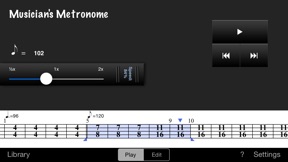


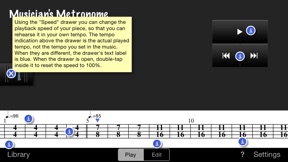
Beschreibung
What customers are saying:
***** "THE metronome for serious classical musicians"
***** "The program doesn't choke on unusual time signatures- you can make them yourself and quickly configure any accent pattern you want."
***** "For what it does, it is the cleanest , fastest and most logical one I've found. It's worth the money if you need the functionality it provides."
***** "This is a GREAT app for any serious classical musician, and I will continue to encourage all my IOS colleagues and students to buy it."
***** "Well worth the small amount charged for this thoughtful and well-engineered tool. I've never seen anything as good for any price."
Most complete metronome available on iOS:
– Enter the measures of your own musical pieces
– Specify any time signature, even per measure if you want
– Specify where the accents are (e.g. 7/8 as 3+2+2 or 2+2+3)
– Specify any tempo, even per measure if you want
– Specify a tempo by tapping it ("tap tempo")
– Select and play a set of measures to rehearse difficult parts
– Slow down or speed up the metronome to rehearse more effectively
– Configure the pitch of the metronome to best match your instrument
– Maintain a list of your musical pieces and share them with others
Musician's Metronome is a high precision, advanced, yet easy to use metronome. In its simplest form, it plays rhythms just like any other metronome. You can, however, also play complex rhythms very easily. It gets even better when your music has many different time signatures and tempos. The user interface of this metronome is designed in such a way that you can enter music very rapidly: after setting up the preset buttons, a single tap will add a new measure with the desired time signature.
To rehearse a specific part of your music, you can select it. When you hit the play button, only the selected measures will be played. If you have enabled auto-repeat in the settings, the part will play over and over again, so that you can thoroughly train it. You can even set it to play slower or faster.
You can set up the time signature preset buttons for every piece. Using the two wheels, you can choose the number of beats in the measure, and the beat duration. Using the buttons at the bottom of the screen, you can indicate the accents in the measure. The numbers on the buttons indicate how the measure should be counted. These accents play with a different sound, so that you can actually hear the difference between 7/8 that is played as 2+2+3 and one that is played as 3+2+2.
You can have many pieces in your library. You can edit the details, add new pieces, delete pieces. You can even share them with fellow musicians: by clicking the action button, you can send the selected piece by e-mail.
When you receive a piece by e-mail, just click the attachment to open it, and import it. It will be added to your library so that you can use it in any way you like.
Using the settings window, you can configure how many measures must be counted of before the actual playing starts. Also, you can configure the metronome sounds, whether playing should auto-repeat, and how much detail you want to see in the measures.
Use the built-in help function to learn how everything works.
Please note: depending on your settings, this app may collect anonymous usage statistics. The sole purpose of this is to better understand how the app is used, so that we can further improve it in the future.
Neue Funktionen von Version 3.1
This app has been updated by Apple to display the Apple Watch app icon.
Updated to support modern devices and iOS versions.
Informationen
Entwickler
Kategorien
Version
3.1
Größe
12,9 MB
Game Center
Nein
VPP Device Licensing
Ja
Bewertung
Altersfreigabe: 4+
Kompatibilität
iOS 8.0 oder neuer
Geräte
iPhone 4S, iPhone 5, iPhone 5c, iPhone 5s, iPhone 6, iPhone 6 Plus, iPhone 6s, iPhone 6s Plus, iPhone SE, iPhone 7, iPhone 7 Plus, iPhone 8, iPhone 8 Plus, iPhone X, iPhone XR, iPhone XS, iPhone XS Max, iPhone 11, iPhone 11 Pro, iPhone 11 Pro Max, iPhone SE (2. Generation), iPhone 12, iPhone 12 Pro, iPhone 12 Pro Max, iPhone 12 mini, iPhone 13, iPhone 13 Pro, iPhone 13 Pro Max, iPhone 13 mini, iPad 2 (Wi-Fi), iPad 2 (3G), iPad (3. Generation) (Wi-Fi), iPad (3. Generation) (4G), iPad (4. Generation) (Wi-Fi), iPad (4. Generation) (4G), iPad (5. Generation) Wi-Fi, iPad (5. Generation) Wi-Fi + Cellular, iPad (6. Generation) Wi-Fi, iPad (6. Generation) Wi-Fi + Cellular, iPad Pro, iPad Pro (Cellular), iPad Pro (9,7 Zoll), iPad Pro (9,7 Zoll) (Cellular), iPad Pro (12,9", 2. Generation), iPad Pro (12,9", 2. Generation) Wi-Fi + Cellular, iPad Pro (10,5"), iPad Pro (10,5") Wi-Fi + Cellular, iPad Pro (11"), iPad Pro (11") Wi-Fi + Cellular, iPad Pro (12,9", 3. Generation), iPad Pro (12,9", 3. Generation) Wi-Fi + Cellular, iPad Air, iPad Air (Cellular), iPad Air 2, iPad Air 2 (Cellular), iPad Air (3. Generation), iPad Air (3. Generation) Wi-Fi + Cellular, iPad mini (Wi-Fi), iPad mini (4G), iPad mini Retina, iPad mini Retina (Cellular), iPad mini 3, iPad mini 3 (Cellular), iPad mini 4, iPad mini 4 (Cellular), iPad mini (5. Generation), iPad mini (5. Generation) Wi-Fi + Cellular, iPad (7. Generation) Wi-Fi + Cellular, iPad Pro 11" (2. Generation), iPad Pro 11" (2. Generation) Wi-Fi + Cellular, iPad Pro 12,9" (4. Generation), iPad Pro 12,9" (4. Generation) Wi-Fi + Cellular, iPad Air (4. Generation) (Wi-Fi), iPad Air (4. Generation) (Wi-Fi + Cellular), iPad (8. Generation) Wi-Fi, iPad (8. Generation) Wi-Fi + Cellular, iPad Pro 11" (3. Generation), iPad Pro 11" (3. Generation) Wi-Fi + Cellular, iPad Pro 12,9" (5. Generation), iPad Pro 12,9" (5. Generation) Wi-Fi + Cellular, iPad (9. Generation), iPad (9. Generation) Wi-Fi + Cellular, iPad mini (6. Generation), iPad mini (6. Generation) Wi-Fi + Cellular, iPod (5. Generation), iPod touch (6. Generation), iPod touch (7. Generation), Apple Watch Series 4, Apple Watch Series 5, Apple Watch Series 6 (GPS), Apple Watch Series 6 (GPS + Cellular), Apple Watch Series SE (GPS), Apple Watch Series SE (GPS + Cellular), Apple Watch Series 7 (GPS), Apple Watch Series 7 (GPS + Cellular)
Sprachen
Englisch
App Store: Kundenbewertungen
Bewertungen & Rezensionen
5,0 von 5 (1 Bewertung)
App Store: Kundenrezensionen
Kein Eintrag