InfoBedingungenDatenschutzKontakt
 
Wird aktualisiert
aSmart HUD 3D +SpeedCams

aSmart HUD 3D +SpeedCams

Veröffentlicht: 2009-09-24
© Atoll Ordenadores, 2009-2018
aSmart HUD 3D +SpeedCams - QR Code
Version 7.3
4+
Laden im App Store
Version 7.3
4+
Laden im App Store
Veröffentlicht: 2009-09-24
© Atoll Ordenadores, 2009-2018

iPhone Screenshots

Screenshot
Screenshot
Screenshot
Screenshot
Screenshot
Screenshot
Screenshot

Beschreibung

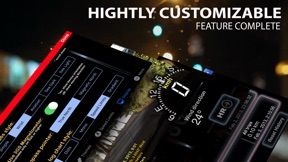
Advanced car digital dashboard combining map, routing, tracking, photo and speed cameras functionality wrapped into nicely polished 3D user interface.
Key features:
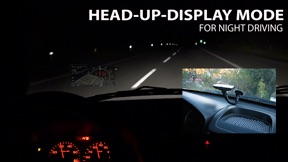
- HUD MODE
- ROUTING AND DRIVING INSTRUCTIONS
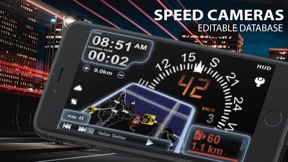
- EDITABLE FIXED AND REDLIGHT SPEED CAMERAS DATABASE
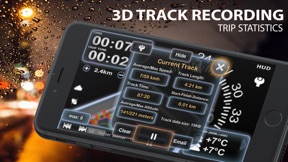
- UNIQUE COMBINED SPEED, LOCATION and ALTITUDE 3D LOG GRAPH
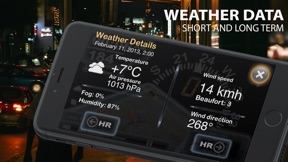
- SHORT-TIME WEATHER FORECAST
- IPOD PLAYLIST REMOTE CONTROL
- PHOTO CAMERA WITH IMAGE MARKING
aSmartHUD visualizes your
- current and average speed
- time
- elapsed trip time
- heading
- altitude
- distance/time to stored Home location
- distance to the trip starting point
- maximum reached speed, altitude and distance to starting point for the current trip and all the trips your ever did,
- current playing music track
- weather forecast for nearest 48 hours the with 3-hour time interval.
Also it shows
- positions of the nearest known speed cameras
- color coded distance to the nearest known speed camera and it's speed limit, if known;
The fixed cameras database includes an information about speed cameras in
- Europe (whole EU)
- USA
- Canada
- Australia
- New Zealand
- Brazil
- South Africa
- Singapore
- United Arab Emirates
- Taiwan
- HongKong
- Kuwait
- Russia
- Thailand
You can edit the database by adding or removing the speed cameras and set cameras speed limit.
NOTE: It's not guaranteed all speed cameras in your area are included into the database. However, we will release database updates right after the new information will become available.
- You can create and save the driving routes to follow them later. Application will display your current position on the route and display the route on the map. 
Every route is saved in the application database, so you don't need to re-create it every time application starts up.
- Tapping the "HUD" icon mirrors all the text, so if you position the iPhone horizontally under your car's windscreen you can see perfectly readable half-transparent reflection of the picture displayed. 
Note: this mode works pretty well at night time and twilight, but on direct sunlight the screen brightness can be insufficient.
- aSmartHUD can keep track on 4 speed limits, giving a warning each time you crossing it. Normally, it's legal speed limits within cities, local roads and high-speed motorways. "Never exceed speed" is the speed you should not exceed under any conditions. Like technical limit of your vehicle or the point where government can arrest your driving license.
- 3D Trip Log Graph - unique way to represent the speed, location and altitude data in a single 3D graph. Color coded speed and altitude chart is constantly adjusted according to your moving trajectory. In Track Preferences, you can set the transparency of all the components of the chart or switch them off completely.
- Apple and OpenStreet maps in several flavors and color modes.
- Landscape and portrait screen modes.
- "Records" screen, with maximum reached speed, altitude and distance from start.
- Different measurement units, display color schemes (6 available), log type, sounds and more.
- Select the music iPod Playlist, pause, play, skip or rewind it's items, set the player in Shuffle or Repeat mode.
- Advanced location Info (longitude and latitude, GPS measurement precision) and more.
- Local weather forecast;
IMPORTANT: this features list in not complete. Please visit the product page for more info!
Thanks to everyone for your suggestions about additional functionality! THE BEST AND FASTEST WAY TO CONTACT US IS SENDING YOUR REQUESTS AND BUG REPORTS to support@atoll-ordenadores.com. WE ARE REALLY INTERESTED IN DIALOG, what is not possible when you leaving the bug-report as AppStore review.

Neue Funktionen von Version 7.3

This app has been updated by Apple to display the Apple Watch app icon.
7.3:
- Tested on latest version of iOS;
- Fixed a bug in speed logging;

Anbieter

Name

Vitalijs Lennojs

Informationen

Kategorien

Version

7.3

Größe

9,3 MB

Game Center

Nein

VPP Device Licensing

Ja

Bewertung

Altersfreigabe: 4+

Kompatibilität

iOS 10.1 oder neuer

Geräte

iPhone 5, iPhone 5c, iPhone 5s, iPhone 6, iPhone 6 Plus, iPhone 6s, iPhone 6s Plus, iPhone SE, iPhone 7, iPhone 7 Plus, iPhone 8, iPhone 8 Plus, iPhone X, iPhone XR, iPhone XS, iPhone XS Max, iPhone 11, iPhone 11 Pro, iPhone 11 Pro Max, iPhone SE (2. Generation), iPhone 12, iPhone 12 Pro, iPhone 12 Pro Max, iPhone 12 mini, iPhone 13, iPhone 13 Pro, iPhone 13 Pro Max, iPhone 13 mini, iPhone SE (3. Generation), iPhone 14, iPhone 14 Plus, iPhone 14 Pro, iPhone 14 Pro Max, iPhone 15, iPhone 15 Plus, iPhone 15 Pro, iPhone 15 Pro Max, iPad (4. Generation) (4G), iPad (5. Generation) Wi-Fi + Cellular, iPad (6. Generation) Wi-Fi + Cellular, iPad Pro (Cellular), iPad Pro (9,7 Zoll) (Cellular), iPad Pro (12,9", 2. Generation) Wi-Fi + Cellular, iPad Pro (10,5") Wi-Fi + Cellular, iPad Pro (11") Wi-Fi + Cellular, iPad Pro (12,9", 3. Generation) Wi-Fi + Cellular, iPad Air (Cellular), iPad Air 2 (Cellular), iPad Air (3. Generation) Wi-Fi + Cellular, iPad mini Retina (Cellular), iPad mini 3 (Cellular), iPad mini 4 (Cellular), iPad mini (5. Generation) Wi-Fi + Cellular, iPad (7. Generation) Wi-Fi + Cellular, iPad Pro 11" (2. Generation) Wi-Fi + Cellular, iPad Pro 12,9" (4. Generation) Wi-Fi + Cellular, iPad Air (4. Generation) (Wi-Fi + Cellular), iPad (8. Generation) Wi-Fi + Cellular, iPad Pro 11" (3. Generation) Wi-Fi + Cellular, iPad Pro 12,9" (5. Generation) Wi-Fi + Cellular, iPad (9. Generation) Wi-Fi + Cellular, iPad mini (6. Generation) Wi-Fi + Cellular, iPad Air (5. Generation) Wi-Fi + Cellular, iPad Pro 11" (4. Generation) Wi-Fi + Cellular, iPad Pro (12,9", 6. Generation) Wi-Fi + Cellular, iPad (10. Generation) Wi-Fi + Cellular

Sprachen

Englisch

App Store: Kundenbewertungen

Bewertungen & Rezensionen

4,0 von 5 (1 Bewertung)

App Store: Kundenrezensionen

2012-09-08

Bon assistant

Bon support pour long voyage. Quelques améliorations pourraient être amenées, mais dans l'ensemble c'est très réussi.
Zimdav
Version 5.5
2011-06-17

Gute App

Also ich habe keine Probleme mit der Feldstärke, und das problem das sich die Windrose erst nach 50m ausrichtet liegt daran, dass man zuerst den Magnetfeldsensor im Optionsmenue einschalten muss, ansonsten ermittelt die App die Fahrtrichzung an hand der bewegung auf der Karte. Einziger Minuspunkt ist das umstäntliches umschalten zwischen Hud und Normalansicht.
wüsstest du wohl gerne
Version 5.1
2010-03-10

iPhone 3GS ...

- der kompass funktioniert nicht sofort, erst wenn man in bewegung ist, mind. 50 m
- die windrose funktioniert überhaupt nicht, dreht nicht, keine nordausrichtung
- GPS-signal wird als schwach angezeigt (alle anderen apps funktionieren perfekt)
- compass does not operate properly after the app-start, just after change of position, at least 50 m
- wind rose does not operate, did not rotate, no north orientation
- weak GPS-signal is pronounced (all other apps are working very with GPS)
n8tstnd-hater