InfoBedingungenDatenschutzKontakt
 
Wird aktualisiert
MobileIron Mobile@Work™ Client

MobileIron Mobile@Work™ Client

Veröffentlicht: 2009-07-27
© 2009 - 2022 MobileIron
MobileIron Mobile@Work™ Client - QR Code
Version 12.11.70
4+
Laden im App Store
Version 12.11.70
4+
Laden im App Store
Veröffentlicht: 2009-07-27
© 2009 - 2022 MobileIron

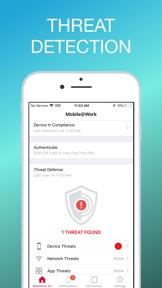
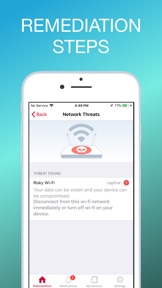
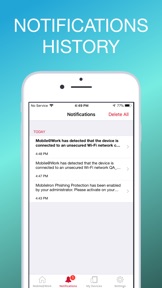
iPhone Screenshots

Screenshot
Screenshot
Screenshot
Screenshot
Screenshot
Screenshot

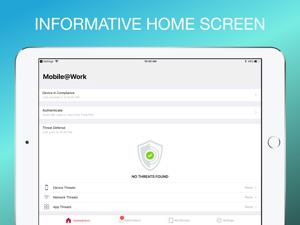
iPad Screenshots

Screenshot
Screenshot
Screenshot
Screenshot
Screenshot
Screenshot

Beschreibung

MobileIron's Mobile@Work securely connects your iOS device to your company network so that you can easily access email and other work resources.
Best Technology
• Purpose-built for Mobile IT with millions of users globally
• Complete separation of corporate and personal data
• 500+ of Global 2000 customers
• More than 97% customer support satisfaction rate
With just a few quick steps, Mobile@Work makes getting access to corporate resources easy on your iOS device:
► PRIVACY: Visual Privacy capabilities provide transparency to employees by allowing them to view exactly which data their company can see and which actions their company can take on the device.
► FAST ACCESS: Immediate access to corporate email, calendar and contacts.
► AUTOMATED: Connect automatically to corporate Wi-Fi and VPN networks.
► EASY: Discover and install work related applications on your device wherever you are.
► SECURE: Automated compliance with corporate security policies.
► FIND MY PHONE: Locate lost or stolen devices and remotely manage them.
NOTES: 1) MobileIron Mobile@Work™ Client requires use of Apple iOS 11.0 or later.
2) Mobile@Work works in conjunction with MobileIron Core deployed by your company’s IT organization. Please follow the instructions from your IT organization to use this app. Mobile@Work is required to access corporate resources and therefore should not be removed without first consulting your IT organization. Visual Privacy allows your organization to see device details such as model name, OS version, roaming status, and company apps. However, IT cannot see personal information such as personal email, text messages, personal contacts, photos and videos and voicemail.
Learn about Mobile Device Management: http://www.mobileiron.com/en/solutions/mobile-device-management
Learn about Mobile Security: http://www.mobileiron.com/en/solutions/mobile-security
Learn about BYOD: http://www.mobileiron.com/en/solutions/byod
Learn about Visual Privacy: https://www.mobileiron.com/en/video/visual-privacy
Follow us on Facebook: https://www.facebook.com/mobileiron
Follow us on Twitter: https://twitter.com/mobileiron
Follow us on G+: https://plus.google.com/+mobileiron
Find more about MobileIron: http://www.mobileiron.com

Neue Funktionen von Version 12.11.70

*Send device compliance data to multiple Microsoft Office 365 tenants: Administrator can configure device compliance data to be sent to multiple (up to 36) Microsoft Office 365 tenants in Standard environment.
*AAD Re-Registration Popup will not show-up on AAD Password change/Reset.
*Device Compliance on the branded client support
*Drop iOS 11 and iOS 12 Support

Anbieter

Name

MobileIron

Informationen

Entwickler

Kategorien

Version

12.11.70

Größe

133,9 MB

Game Center

Nein

VPP Device Licensing

Ja

Bewertung

Altersfreigabe: 4+

Kompatibilität

iOS 13.0 oder neuer

Geräte

iPhone 5s, iPhone 6, iPhone 6 Plus, iPhone 6s, iPhone 6s Plus, iPhone SE, iPhone 7, iPhone 7 Plus, iPhone 8, iPhone 8 Plus, iPhone X, iPhone XR, iPhone XS, iPhone XS Max, iPhone 11, iPhone 11 Pro, iPhone 11 Pro Max, iPhone SE (2. Generation), iPhone 12, iPhone 12 Pro, iPhone 12 Pro Max, iPhone 12 mini, iPhone 13, iPhone 13 Pro, iPhone 13 Pro Max, iPhone 13 mini, iPhone SE (3. Generation), iPad (5. Generation) Wi-Fi, iPad (5. Generation) Wi-Fi + Cellular, iPad (6. Generation) Wi-Fi, iPad (6. Generation) Wi-Fi + Cellular, iPad Pro, iPad Pro (Cellular), iPad Pro (9,7 Zoll), iPad Pro (9,7 Zoll) (Cellular), iPad Pro (12,9", 2. Generation), iPad Pro (12,9", 2. Generation) Wi-Fi + Cellular, iPad Pro (10,5"), iPad Pro (10,5") Wi-Fi + Cellular, iPad Pro (11"), iPad Pro (11") Wi-Fi + Cellular, iPad Pro (12,9", 3. Generation), iPad Pro (12,9", 3. Generation) Wi-Fi + Cellular, iPad Air, iPad Air (Cellular), iPad Air 2, iPad Air 2 (Cellular), iPad Air (3. Generation), iPad Air (3. Generation) Wi-Fi + Cellular, iPad mini Retina, iPad mini Retina (Cellular), iPad mini 3, iPad mini 3 (Cellular), iPad mini 4, iPad mini 4 (Cellular), iPad mini (5. Generation), iPad mini (5. Generation) Wi-Fi + Cellular, iPad (7. Generation) Wi-Fi + Cellular, iPad Pro 11" (2. Generation), iPad Pro 11" (2. Generation) Wi-Fi + Cellular, iPad Pro 12,9" (4. Generation), iPad Pro 12,9" (4. Generation) Wi-Fi + Cellular, iPad Air (4. Generation) (Wi-Fi), iPad Air (4. Generation) (Wi-Fi + Cellular), iPad (8. Generation) Wi-Fi, iPad (8. Generation) Wi-Fi + Cellular, iPad Pro 11" (3. Generation), iPad Pro 11" (3. Generation) Wi-Fi + Cellular, iPad Pro 12,9" (5. Generation), iPad Pro 12,9" (5. Generation) Wi-Fi + Cellular, iPad (9. Generation), iPad (9. Generation) Wi-Fi + Cellular, iPad mini (6. Generation), iPad mini (6. Generation) Wi-Fi + Cellular, iPad Air (5. Generation), iPad Air (5. Generation) Wi-Fi + Cellular, iPod touch (6. Generation), iPod touch (7. Generation)

Sprachen

Deutsch, Chinesisch, Englisch, Finnisch, Französisch, Italienisch, Japanisch, Koreanisch, Niederländisch, Polnisch, Portugiesisch, Rumänisch, Schwedisch, Slowakisch, Spanisch, Ungarisch

App Store: Kundenbewertungen

Bewertungen & Rezensionen

2,4 von 5 (44 Bewertungen)

App Store: Kundenrezensionen

2019-08-20

Beste app ever

Beste app ever!!
Dfhjug
Version 10.2
2019-08-05

Überwachungsstaat

Überwachungsstaat pur
Hepiat
Version 10.1.0
2019-03-28

Tastatur für Passwort

Seit dem letzten Update erscheint für die Eingabe des Passworts nur noch eine Zahlentastatur, ich brauche für mein Passwort aber Buchstaben. Das ist ärgerlich!
Hornecker (v 2.0)
Version 9.0.1
2018-10-19

Super!

Lauft auf dem IPhone X Perfekt. Tolles App
typazz
Version 6.2
2017-02-23

zurück zur Schiefertafel :(

grenzenlos umständlich
anago-san
Version 4.5.12
2016-12-13

Hhhhh

Unbrauchbar. iPhone nutzlos, super App weekcal ausser Betrieb
Ahjjjhhgfffhjko
2015-03-25

If your private data matter... Don't use that!

At first look, this app look very useful... BUT don't let this come on your private iPhone !
My company defined a profile together with MobileIron which
- required a stronger unlock code
- allows to track my private iPhone
- performs a reset to factory default upon 5 wrong code
Using exclusively the TouchID, after 1 month I forgot the code... Upon a restart... I entered 6 wrong codes... iPhone reset.
Luckily I had a not so old backup. But all private data (messages, pictures, ...) since the last backup are gone.
AlSuMa
Version 6.1.1
2014-10-17

App für Fernsteuerung eures Gerätes

💩
Danko40
Version 4.2.7
2014-09-01

Super App

Für Businessanwendung genial.
Akkim79
Version 6.0.1
2013-06-26

Unbrauchbar / totale ueberwachung misslungen

Auf anordnung mehrmals erfolglos zu installieren versucht. Diese App dient nichts anderem, als der geezenlosen Ueberwachung s. Webseite
Elcoco 456
Version 11.1.0
2012-03-07

Überwachungssoftware

Diese Software kann zur totalen Überwachung von Mitarbeitern eingesetzt werden und gehört deshalb verboten. Man kann auch anders sicher mir Firmen-Exchange-Server verbinden !
Humpfie
Version 9.6
2011-12-05

Great APP

It's perfect!!! Our company decidedl to introduce Mobileiron. Thanks to this APP I now have access to my business mail, calendar and contacts!!
Runway28
Version 5.7.0
2011-11-28

IOS 5

Bitte Kompatibilität unter IOS 5 herstellen!!!
Frusti1
Version 11.0.0