InfoBedingungenDatenschutzKontakt
 
Wird aktualisiert
Storyist 4

Storyist 4

Veröffentlicht: 2019-03-06
© 2021 Storyist Software LLC
Storyist 4 - QR Code
Version 4.3
4+
Laden im App Store
Version 4.3
4+
Laden im App Store
Veröffentlicht: 2019-03-06
© 2021 Storyist Software LLC

iPhone Screenshots

Screenshot
Screenshot
Screenshot
Screenshot
Screenshot

iPad Screenshots

Screenshot
Screenshot
Screenshot
Screenshot
Screenshot
Screenshot
Screenshot

Beschreibung

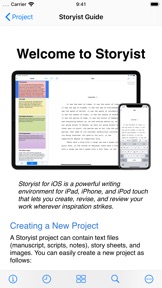
Storyist is a powerful writing environment that lets you create, review, and revise your work wherever inspiration strikes.
“If I could have only one screenwriting app on my iPad, Storyist would be it.” – Taz Goldstein, Hand Held Hollywood.
“I'm currently traveling in Europe and am just now putting the finishing touches on the book that will be published in September. I'm using the Storyist app for my iPad Mini and it's sensational... a real godsend.” – Michael Brandman, Bestselling Author.
With Storyist, you can:
• Produce submission-ready manuscripts and screenplays. Storyist provides a rich text editor with support for comments, images, headers, footers, and style sheets so you can create properly formatted manuscripts and screenplays. And Storyist comes with manuscript and screenplay templates so you can focus on the writing, not the formatting.
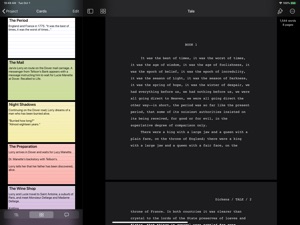
• Work with your story at a high-level. Storyist lets you sketch out a story using index cards and then refine it with customizable plot, character, and setting sheets. When you're ready to put words on the page, Storyist can even display your index cards next to your manuscript as you write.
• Review and revise on the go. Have a few minutes? Open Storyist and jot down a note, rewrite a few paragraphs, or annotate your manuscript with ideas for future changes.
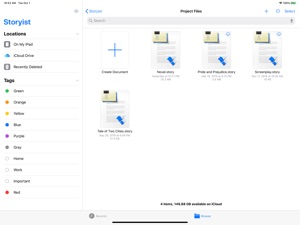
• Keep all your writing organized and accessible. Storyist organizes your novel manuscripts, screenplays, notes, and other project-related writing so you can access them with just a few taps. And the Files app support lets you store your projects where you want and edit them in place.
Features at a Glance
• Rich text editor with support for fonts, colors, comments, images, headers, footers, and style sheets.
• Files interface with the ability to collaborate with other writers, browse version history, and sync with your favorite cloud storage service.
• Automatic manuscript and screenplay formatting with familiar tab and return key shortcuts.
• Color-coded index cards.
• Customizable story sheets.
• Easy import and export of text and images.
• Support for Storyist for Mac, RTF, Plain Text, Fountain, and Final Draft FDX files.
• Ability to export text files as PDF.
• Wireless printing with AirPrint.
• Courier Prime font for screenplays.
Try Storyist 4 for free for 14 days. After the trial period ends, you can purchase Storyist 4 to continue using the editing features or use the app in reader mode for free. Upgrade pricing is available for customers who purchased Storyist 3 for iOS. No subscription required.

Neue Funktionen von Version 4.3

* Enhanced comment support. It's now easier to create and review comments both with and without the comment sidebar visible.
* New keyboard shortcuts. When running on iOS 15, you can now tab between the sidebar and the editor, and use the arrow keys to move between elements in outlines and lists.
* Bug fixes and performance improvements.

Anbieter

Name

Storyist Software

Informationen

Kategorien

Version

4.3

Größe

22,7 MB

Game Center

Nein

VPP Device Licensing

Ja

Bewertung

Altersfreigabe: 4+

Kompatibilität

iOS 14.1 oder neuer

Geräte

iPhone 5s, iPhone 6, iPhone 6 Plus, iPhone 6s, iPhone 6s Plus, iPhone SE, iPhone 7, iPhone 7 Plus, iPhone 8, iPhone 8 Plus, iPhone X, iPhone XR, iPhone XS, iPhone XS Max, iPhone 11, iPhone 11 Pro, iPhone 11 Pro Max, iPhone SE (2. Generation), iPhone 12, iPhone 12 Pro, iPhone 12 Pro Max, iPhone 12 mini, iPhone 13, iPhone 13 Pro, iPhone 13 Pro Max, iPhone 13 mini, iPhone SEThirdGen, iPad (5. Generation) Wi-Fi, iPad (5. Generation) Wi-Fi + Cellular, iPad (6. Generation) Wi-Fi, iPad (6. Generation) Wi-Fi + Cellular, iPad Pro, iPad Pro (Cellular), iPad Pro (9,7 Zoll), iPad Pro (9,7 Zoll) (Cellular), iPad Pro (12,9", 2. Generation), iPad Pro (12,9", 2. Generation) Wi-Fi + Cellular, iPad Pro (10,5"), iPad Pro (10,5") Wi-Fi + Cellular, iPad Pro (11"), iPad Pro (11") Wi-Fi + Cellular, iPad Pro (12,9", 3. Generation), iPad Pro (12,9", 3. Generation) Wi-Fi + Cellular, iPad Air, iPad Air (Cellular), iPad Air 2, iPad Air 2 (Cellular), iPad Air (3. Generation), iPad Air (3. Generation) Wi-Fi + Cellular, iPad mini Retina, iPad mini Retina (Cellular), iPad mini 3, iPad mini 3 (Cellular), iPad mini 4, iPad mini 4 (Cellular), iPad mini (5. Generation), iPad mini (5. Generation) Wi-Fi + Cellular, iPad (7. Generation) Wi-Fi + Cellular, iPad Pro 11" (2. Generation), iPad Pro 11" (2. Generation) Wi-Fi + Cellular, iPad Pro 12,9" (4. Generation), iPad Pro 12,9" (4. Generation) Wi-Fi + Cellular, iPad Air (4. Generation) (Wi-Fi), iPad Air (4. Generation) (Wi-Fi + Cellular), iPad (8. Generation) Wi-Fi, iPad (8. Generation) Wi-Fi + Cellular, iPad Pro 11" (3. Generation), iPad Pro 11" (3. Generation) Wi-Fi + Cellular, iPad Pro 12,9" (5. Generation), iPad Pro 12,9" (5. Generation) Wi-Fi + Cellular, iPad (9. Generation), iPad (9. Generation) Wi-Fi + Cellular, iPad mini (6. Generation), iPad mini (6. Generation) Wi-Fi + Cellular, iPad AirFifthGen, iPad AirFifthGenCellular, iPod touch (6. Generation), iPod touch (7. Generation)

Sprachen

Englisch, Französisch, Spanisch

App Store: Kundenbewertungen

Bewertungen & Rezensionen

4,5 von 5 (8 Bewertungen)

App Store: Kundenrezensionen

2022-02-18

Beste

Toll zum Bücher schreiben ich habe eine hp vortsetzung geschrieben ist echt gut geworden
auslandsjahr
Version 4.3
2020-09-19

Great

It’s really great app, I just wanted to ask if you can add widgets for ios 14, again guys great gob
eliaandrioletti
Version 4.2