InfoBedingungenDatenschutzKontakt
 
Wird aktualisiert
FIBARO Home Center

FIBARO Home Center

Veröffentlicht: 2019-01-08
© Fibar Group S.A. 2018
FIBARO Home Center - QR Code
Version 1.0.0
4+
Laden im App Store
Version 1.0.0
4+
Laden im App Store
Veröffentlicht: 2019-01-08
© Fibar Group S.A. 2018

iPhone Screenshots

Screenshot
Screenshot
Screenshot
Screenshot
Screenshot

Beschreibung

The new FIBARO Home Center app is a combination of up to day trends and cutting-edge technology to make smart home management even more comfortable and efficient.
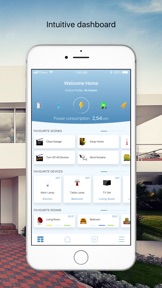
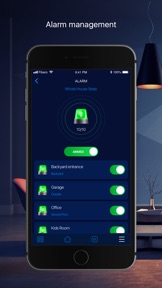
The new app is equipped with an intuitive dashboard designed to every last detail. After switching the app on, you can immediately see the Home Summary displaying everything you need to know about your home with just one glimpse. Monitor the state of the alarm, temperature, lighting, doors and windows, blinds and gates, switches and many more depending on your preferences.
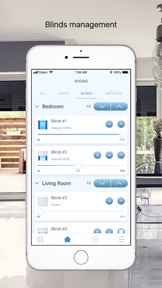
See the Room Summary to manage all the devices in the system in a given room. It’s a comfortable and quick way of adjusting the space to your needs at all times.
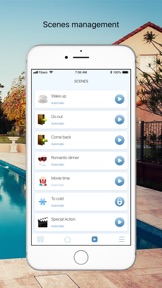
FIBARO Home Center presents a very convenient way of managing all the scenes that you use at home. Monitor them, change the settings and switch on and off within one click.
FIBARO Home Center uses machine learning to learn your habits and preferences. It suggests which actions you want to take on the basis of your previous behaviors.
With FIBARO Home Center you can manage your home with your iPhone or Apple Siri voice assistant. The app is compatible with these devices so you can switch on/off scenes with one voice command.
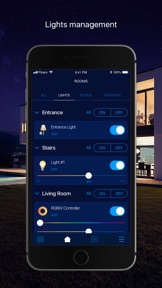
The app features 3 color themes:
Silver Light
Light Blue
Dark Blue
Choose the color that suits you best or simply use the light versions during the day and the dark one in the evening to care about your eyes.
Download the app now.

Anbieter

Name

Fibar Group S.A.

Informationen

Kategorien

Version

1.0.0

Größe

52,2 MB

Game Center

Nein

VPP Device Licensing

Ja

Bewertung

Altersfreigabe: 4+

Kompatibilität

iOS 9.3 oder neuer

Geräte

iPhone 11 Pro Max, iPad Air 2 (Cellular), iPad mini Retina (Cellular), iPad Pro (11"), iPad (5. Generation) Wi-Fi, iPad (6. Generation) Wi-Fi, iPod touch (6. Generation), iPad Pro (11") Wi-Fi + Cellular, iPad (6. Generation) Wi-Fi + Cellular, iPad Pro (12,9", 3. Generation), iPad (5. Generation) Wi-Fi + Cellular, iPad mini (5. Generation) Wi-Fi + Cellular, iPad mini (5. Generation), iPad Pro, iPad mini 3, iPad mini 4 (Cellular), iPad mini 4, iPhone 11, iPod touch (7. Generation), iPad mini 3 (Cellular), iPad Air, iPad Air 2, iPad Pro (12,9", 2. Generation), iPad Pro (Cellular), iPad Pro (9,7 Zoll) (Cellular), iPad Pro (10,5") Wi-Fi + Cellular, iPad Pro (9,7 Zoll), iPad mini Retina, iPad Air (Cellular), iPad Air (3. Generation) Wi-Fi + Cellular, iPhone 6 Plus, iPad Air (3. Generation), iPad Pro (10,5"), iPad Pro (12,9", 2. Generation) Wi-Fi + Cellular, iPhone 6, iPhone XR, iPhone XS, iPhone 6s, iPhone SE, iPhone 7 Plus, iPhone 6s Plus, iPhone 5s, iPhone X, iPhone 8, iPhone XS Max, iPhone 8 Plus, iPhone 7, iPhone 5, iPad (7. Generation) Wi-Fi, iPhone 5c, iPad (7. Generation) Wi-Fi + Cellular, iPhone 11 Pro, iPad Pro (12,9", 3. Generation) Wi-Fi + Cellular

Sprachen

Englisch

App Store: Kundenbewertungen

Bewertungen & Rezensionen

1,0 von 5 (3 Bewertungen)

App Store: Kundenrezensionen

2019-01-09

Empty Screen

Login results in an empty screen - “Select Your Home” - without an option to select anything 😐
haraldf